If you’ve ever stopped to wonder how your phone’s screen goes dark when you hold it to your ear, or how a hand sanitizer dispenser automatically releases gel when your hands are nearby, you’ve encountered one of the most underrated workhorses of modern consumer and industrial tech: the infrared (IR) proximity sensor. As a supplier of these little devices, I get asked this question all the time—usually from design engineers tweaking a new smart appliance, startup founders prototyping a wireless gadget, or even hobbyists trying to fix a wonky door sensor. The most common question, though, is simple: What exactly is the output signal of an IR proximity sensor? Infrared Proximity Sensor
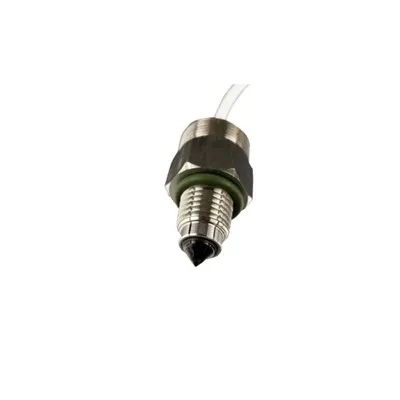
Let’s cut through the jargon and start with the basics, because you can’t understand the output without first understanding how the sensor itself works. At its core, an IR proximity sensor has two key components: an IR LED (the emitter) and an IR photodiode (the detector). The emitter blasts out invisible infrared light, usually at a wavelength around 940 nanometers—this is the sweet spot for these sensors because it’s common across consumer and industrial designs, and it’s not easily blocked by ambient room light (well, most of the time, anyway). When an object is within range, some of that emitted IR light bounces off the object and travels back to the photodiode. The bigger or closer the object, the more reflected light the detector picks up. That’s the core principle, but here’s where it gets interesting: the output signal isn’t just a single number—it changes depending on the type of sensor, its design, and what you’re using it for.
Let’s break down the main types of IR proximity sensors first, because that’s the biggest factor in what their output looks like. The two most common categories are discrete (or analog) IR proximity sensors and digital (or integrated) IR proximity sensors. I’ve worked with both types over the years, and each has a very different output signal, which makes sense because they’re built for different jobs.
Take analog IR proximity sensors first. These are the simpler, more bare-bones versions—usually the ones you’ll find in low-cost applications, like a basic hand dryer or a entry-level automatic faucet. Their output signal is an analog voltage, which means it’s a continuous range of values, not just “on” or “off.” Let’s say, for example, when there’s no object in front of the sensor, the photodiode picks up almost no reflected light, so the output voltage is a low, steady 0.1 volts. When you move a hand 10 centimeters away, the reflected light increases, so the output voltage jumps up to 2 volts. Move the hand closer, say 5 centimeters, and the voltage goes even higher, to 3.5 volts, until it hits a maximum threshold of, say, 5 volts (the typical supply voltage for these sensors). The key here is that the output voltage correlates directly with the amount of reflected IR light, which correlates with the distance of the object. So an analog sensor’s output is like a dimmer switch—its value changes smoothly as the object moves. The downside? You have to set a threshold yourself. If you only care if an object is within 15 centimeters, you have to program your microcontroller to read the analog voltage and decide if it’s above or below that 15cm threshold. If ambient light changes—like a room getting brighter from sunlight—the analog output can drift, because the photodiode is also picking up extra ambient IR light. That’s why analog sensors aren’t great for high-precision work, but they’re cheap and easy to use for basic applications.
Then there’s digital IR proximity sensors, which are the workhorses for most modern designs. These are the ones with integrated signal processing built right in, so they do a lot of the heavy lifting that an engineer would have to do with an analog sensor. Their output isn’t a voltage—it’s a digital signal, which means it’s either high (like 3.3 volts) or low (like 0 volts), or it communicates over a serial protocol like I2C or UART. Wait, I know that sounds vague, so let’s get specific. The most common digital output for these sensors is a binary on/off signal, but they also often send distance data. Let’s go back to that phone screen example: when you hold your phone to your ear, the proximity sensor senses your face, and the microcontroller gets a digital signal that says “object present,” so it cuts the screen. No extra programming needed for basic detection—most digital sensors have a built-in threshold that you can adjust with a simple command, instead of wiring up an analog-to-digital converter (ADC) and calibrating it yourself. For more advanced digital sensors, like the ones we supply for industrial automation or robotics, the output is actual distance data, often in millimeters or centimeters, sent over I2C so your system can get precise measurements. If you’re building a line-following robot that needs to stop 2 centimeters away from a wall, a digital sensor with a distance output is perfect. It will send you a number like 20mm, not just a “wall here” or “wall not here” signal. That’s a huge difference from analog, because it takes all the noise out of ambient light and gives you consistent, repeatable data.
Wait, but there’s another type of output that I get questions about all the time: pulse output. Some IR proximity sensors, especially the ones used in motion detection or counting applications (like counting how many packages pass by on a conveyor belt), output a pulsed digital signal, not just a constant high or low. Let’s say you have a package moving past the sensor every second. When a package is in front of the sensor, the output goes high for 0.5 seconds, then low for 0.5 seconds when there’s no package. That pulse rate is directly tied to how often objects pass by, so you can count them by counting the number of pulses. I actually had a client last year who was building a inventory system for a warehouse, and he was using these pulse output sensors to count empty crates moving on a roller conveyor. The pulse output was perfect for his system, because his existing conveyor controller could read pulses directly without needing to process a full distance value. It’s a more specialized output, but it’s super useful for specific industrial use cases.
Now, let’s talk about what affects the output signal, because it’s not just the type of sensor. Over the years, I’ve seen too many engineers get tripped up by this, thinking the output is fixed, but it’s actually dependent on a few key factors. First, the color and texture of the object. A white, matte object reflects almost all IR light, so the output signal will be much higher than a black, glossy object, which absorbs a lot of IR light. I remember a client who was testing a proximity sensor for a vending machine, and they were confused why the sensor would never detect a dark soda can. It turned out the glossy black aluminum of the can was absorbing 80% of the IR light, so the sensor’s output was too low to trigger. We had to adjust the sensor’s gain (the sensitivity) to compensate, which fixed the problem. Second, ambient light. If you’re using the sensor outdoors, sunlight has a lot of IR light in it, which the photodiode picks up, so the output signal will be higher than it would be indoors. That’s why outdoor sensors have a built-in IR filter to block ambient light, but even then, you have to calibrate the threshold for the specific environment. Third, the range of the sensor. A short-range sensor (up to 10cm) will have a much more sensitive output signal than a long-range sensor (up to 1 meter), because the reflected light is stronger at close distances. If you use a short-range sensor for a 50cm application, the output will be so noisy you can’t use it, and vice versa.
As a supplier, I’ve learned that the biggest mistake people make is assuming all IR proximity sensors have the same output. Let’s walk through a real example of what the output looks like in practice, just to make it concrete. Suppose you’re using one of our standard discrete analog IR proximity sensors, rated for 0-20cm range. When you connect it to an ADC on your Arduino or Raspberry Pi, here’s what the output will look like: at 0cm (the sensor’s face), the voltage is around 4.8V; at 5cm, it drops to 3.2V; at 10cm, it’s 1.5V; at 15cm, it’s 0.5V; and at 20cm or beyond, it’s around 0.1V, since almost no light is reflected back. That’s a smooth, linear (mostly) output that you can calibrate to trigger a signal when the voltage is above 0.5V, which would mean an object is within 15cm. For our digital proximity sensors with I2C output, the output is a 16-bit value that corresponds directly to distance: 0 = no object, 100 = 10cm, 200 = 20cm, etc. You can read that value directly from your microcontroller without any extra processing, which saves time and reduces errors.
Another thing I always clarify is that IR proximity sensor output is not like a camera or a LiDAR sensor. It’s not giving you a 2D or 3D image of the surrounding area—its output is a very simple measurement of whether something is there, or how far away it is, based on reflected IR light. That simplicity is what makes it so useful, but it also means you have to match the sensor to your application. If you need to detect a small object from a distance, don’t get a short-range sensor. If you need to get precise distance measurements, don’t get an analog sensor that requires manual calibration.
Over the years, I’ve also had clients ask about common issues with the output signal—things like noise, drift, or false triggering. Let’s address that, because it’s tied directly to what the output should look like. Noise is usually caused by ambient light, especially flickering fluorescent lights, which emit IR light at a frequency that interferes with the sensor’s emitter. A good digital sensor with built-in filtering will reject that noise, so the output stays consistent. Drift is when the output voltage changes over time, usually from temperature changes—extreme heat can make the photodiode less sensitive, so the output is lower than it should be. We design our sensors with temperature compensation to minimize that, but it’s something to keep in mind for harsh environments. False triggering happens when something that’s not your target object triggers the sensor—like a wall or a table—so you have to adjust the threshold or use a sensor with adjustable gain to filter out those unwanted reflections.
At the end of the day, understanding the output signal of an IR proximity sensor is the first step to using it effectively, whether you’re building a simple automatic soap dispenser or a complex industrial robotic arm. For our team, that’s why we don’t just sell sensors—we work with customers to figure out which output type (analog, digital, pulse, distance, etc.) is best for their specific application, because getting that right makes all the difference between a product that works reliably and one that’s full of headaches.
If you’re in the process of designing a new project, troubleshooting a faulty proximity sensor, or just want to learn more about how IR proximity sensors can work for your business, I’m here to help. Whether you need a small batch for a prototype or a bulk order for a full production run, our team can walk you through the details of different sensor types, their output signals, and which one will fit your needs best. Don’t hesitate to reach out to our team to discuss your project and find the right IR proximity sensor solution for you.
Smart Leak Detection System References
- Fraden, J. (2016). Handbook of Modern Sensors: Physics, Designs, and Applications (5th ed.). Springer.
- “Infrared Proximity Sensors: Working Principles and Applications.” Texas Instruments Technical Document, 2021.
- Ong, C. K. (2008). Optical Sensors and Their Applications. John Wiley & Sons.
Shenzhen Fineherc Technology Co., Ltd.
As one of the most experienced infrared proximity sensor suppliers in China, we’re featured by quality products and low price. Please feel free to buy discount infrared proximity sensor made in China here from our factory. Welcome to view our website for more information.
Address: 5th Floor, Building D, No. 39, Keji East Road, Torch Development Zone, Zhongshan City,China
E-mail: fineherc@hotmail.com
WebSite: https://www.fineherc.com/
